
Body & Battery Indicators
The robot displays its current status through the head-screen expression, the chest light, and the ear lights. The chest light is mainly used to indicate the robot's operating, power, and fault status. The ear lights are mainly used to indicate real-time interaction status such as listening and speaking.
| Category | Status | Description | Chest Light | Ear Light |
|---|---|---|---|---|
| Daily | Resting | The robot is lifted and no other status is triggered. | Light off | Light off |
| Standby | The robot is powered on and waiting for user action. | Solid white | Solid white | |
| Charging | The robot is charging and the battery is not yet full. | Breathing white | Breathing white | |
| Working | The robot is performing tasks such as navigation, narration, delivery, dance, and combat. | Solid white | Solid white | |
| Voice interaction | Listening | The robot is receiving user voice input. | White flowing | White flowing |
| Speaking | The robot is performing voice-interaction tasks such as dialogue, narration, or skill expression. Note: dance, system broadcast, and client-triggered audio playback are NOT triggered. |
Solid white | ||
| Reminders and Faults | Find Robot | The user is locating the robot through the client. | Red strobe (period ~300 ms) | |
| Reminders and Faults | Severe Fault | A severe fault has occurred. Stop use immediately and inspect it according to the system prompts. | Red flashing (period ~800 ms) | |
| Reminders and Faults | Fault | A fault has occurred and must be handled according to the system prompts. | Solid red | |
| Reminders and Faults | Warning | A condition requiring attention has occurred; for example, when one battery is removed, the robot displays the warning light effect. | Warning light | |
| Reminders and Faults | Device Locked | The robot has entered the locked state. | ||
| Reminders and Faults | Low Battery | Either battery is at 15% or below. Recharge or replace promptly. | Breathing red |
Battery Indicator
❗ Note: When using battery power, closely monitor the battery level. Low or nearly depleted batteries may cause the robot to topple suddenly due to insufficient power. Recharge or replace the battery immediately when only one indicator remains to maintain stable operation and avoid injury.
Location of Battery Indicator Lights
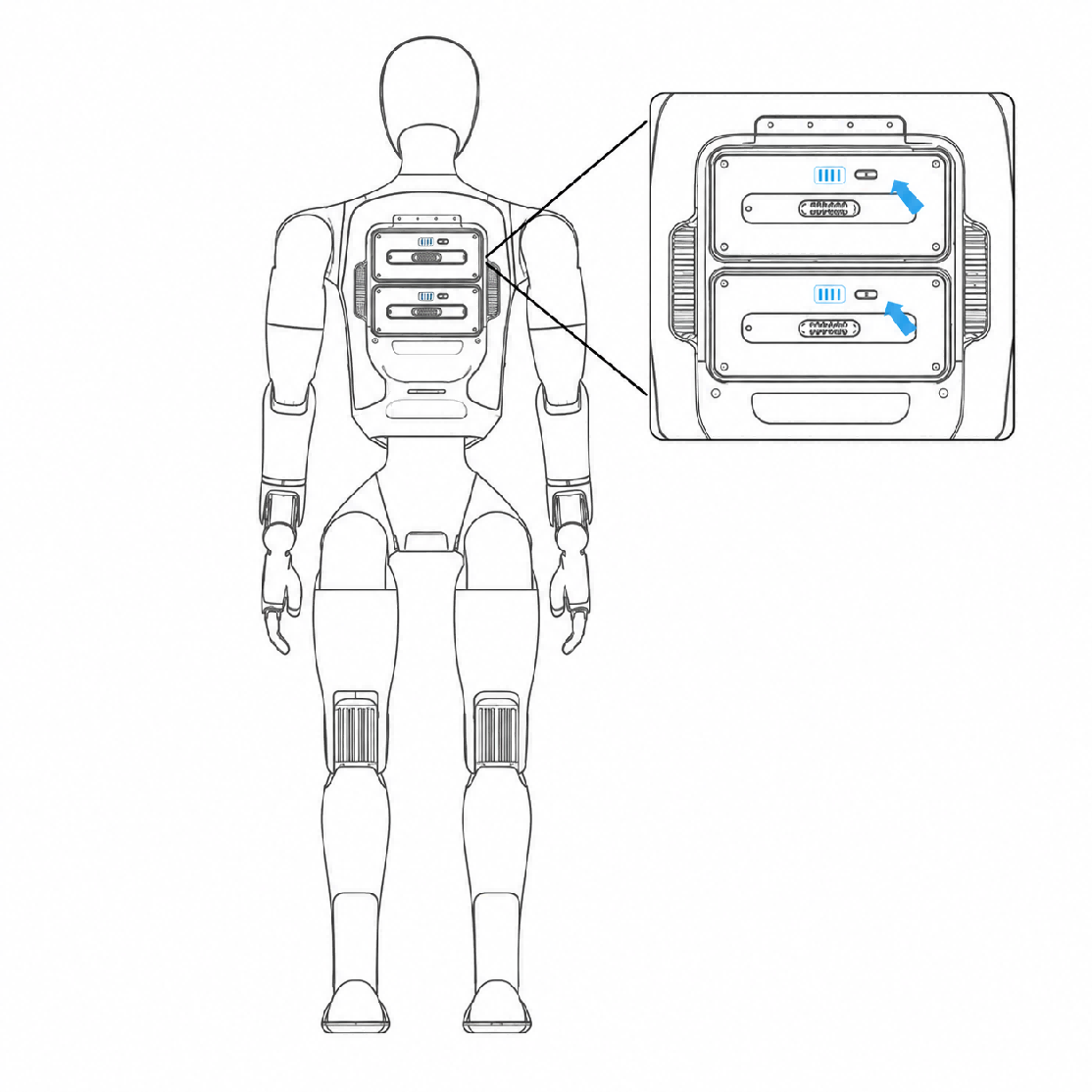
Indicator Status Description (Working)
| Battery Light Status (Working) | Battery Level | Status Description |
|---|---|---|
| All LEDs off | 0% | No power |
| LED1 on, LEDs 2-4 off | 1% ≤ Battery Level < 25% | Critical Low Power (Recharge Immediately) |
| LEDs 1-2 on, LEDs 3-4 off | 25% ≤ Battery Level < 50% | Low Power (Plan for Recharge) |
| LEDs 1-3 on, LED4 off | 50% ≤ Battery Level < 75% | Sufficient power |
| LEDs 1-4 on | 75% ≤ Battery Level < 100% | Full power |
Indicator Status Description (Charging)
| Battery Light Status (Charging) | Battery Level | Status Description |
|---|---|---|
| LED1 breathing, LEDs 2-4 off | Battery Level < 25% | Critical Low Power |
| LED1 on, LED2 breathing, LEDs 3-4 off | 25% ≤ Battery Level < 50% | Low Power: Do not disconnect |
| LEDs 1-2 on, LED3 breathing, LED4 off | 50% ≤ Battery Level < 75% | Medium Power: Operable; charge to full recommended |
| LEDs 1-3 on, LED4 breathing | 75% ≤ Battery Level < 100% | Sufficient Power |
| LEDs 1-4 on | Battery Level = 100% | Charging Complete |