
2.4 Battery Indicator Lights
When the robot is powered by the battery, monitor the battery level carefully. If the battery power is low or nearly depleted, the robot may lose power suddenly and collapse. When only one indicator light remains on, charge or replace the battery promptly.
2.4.1 Battery Indicator Location
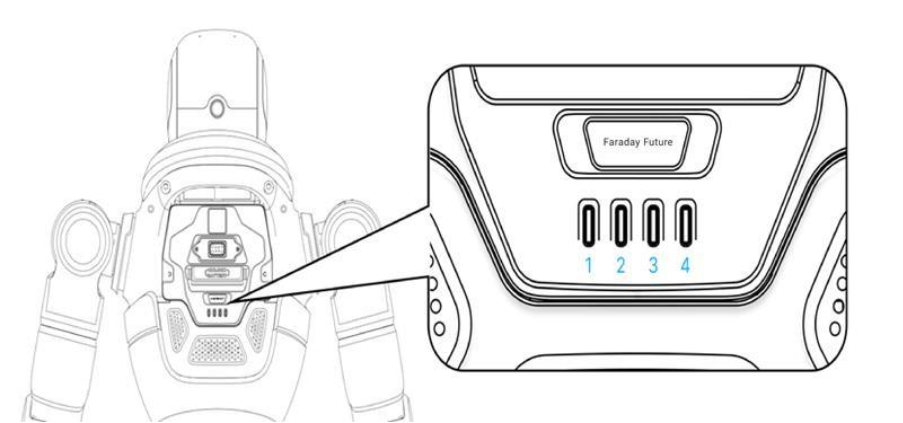
2.4.2 Battery Indicator Description
2.4.2.1 Battery Indicator Status (During Discharge)
| Battery Indicator Status | Battery Level Description | Status Description |
|---|---|---|
| LEDs 1-4 steady on | 75% <= SOC < 100% | Fully charged |
| LEDs 1-3 steady on | 50% <= SOC < 75% | Battery level sufficient |
| LEDs 1-2 steady on | 25% <= SOC < 50% | Normal battery level |
| LED 1 steady on | 15% <= SOC < 25% | Low battery, recharge soon |
| LED 1 flashing | SOC < 15% | Critically low power, charge immediately |
2.4.2.2 Battery Indicator Status (During Charging)
| Battery Indicator Status | Battery Level Description | Status Description |
|---|---|---|
| LED1 breathing, LEDs 2-4 off | SOC < 25% | Initial charging stage |
| LED1 steady on, LED2 breathing | 25% <= SOC < 50% | Low battery |
| LEDs 1-2 steady on, LED3 breathing | 50% <= SOC < 75% | Medium battery level |
| LEDs 1-3 steady on, LED4 breathing | 75% <= SOC < 100% | Battery nearly full |
| LEDs 1-4 steady on | SOC = 100% | Fully charged |
2.4.2.3 Battery Indicator Status (Other Conditions)
| No. | Color | LED1 | LED2 | LED3 | LED4 | Status Description |
|---|---|---|---|---|---|---|
| 1 | Green | Displays according to SOC status | Normal | |||
| 2 | Flashes once per second | Flashes once per second | Flashes once per second | Flashes once per second | Protection mode | |
| 3 | Red | Flashes once per second | Fault, requires repair | |||
| 4 | - | All LEDs off | Power-off or very low SOC |