
3.5 Remote Control User Guide
3.5.1 Mode Description
| Concept | Description |
|---|---|
| Zero-Torque Mode | Default state after power-on. All motors stop active motion and the robot can fall over. Use with caution. |
| Damping Mode | All joints enter a damping state. The robot may slowly collapse. |
| Standing Preparation Mode | Position-controlled standing. Commonly used for hoisting and lowering. The robot does not self-balance in this mode. |
| Sitting Preparation Mode | Position-controlled sitting. Used for sitting or supine-position startup. |
| Stable Standing Mode | Force-controlled standing with active posture recovery and balance capability. |
| Locomotion Mode | The robot can move forward, backward, left, right, and rotate. |
| Emergency-Stop Mode | The robot stops safely and may softly fall to the ground. |
| Off-Road Mode (Beta) | Fast-running control state for rough terrain. |
Precautions:
- It is recommended to operate the robot on flat, hard surfaces.
- Do not trigger emergency-stop mode or damping mode unless necessary.
- Control priority is
Remote Controller > App > Voice Interaction.
3.5.2 Remote Control Instructions
3.5.2.1 Remote Control Button Positions

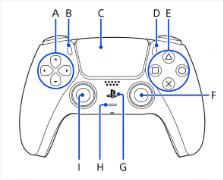
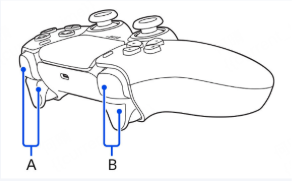
| Button position | Meaning |
|---|---|
| L1, L2 | Left buttons / triggers |
| R1, R2 | Right buttons / triggers |
| Arrow buttons | Up, down, left, right |
| Create | Create button |
| Touchpad | Touchpad |
| Options | Options button |
| Action buttons | Triangle, Square, Circle, Cross |
| Left Stick | Forward / backward / left / right |
| Right Stick | Rotation |
3.5.2.2 Remote Controller LED Indicator Guide
| Status Description | LED Color / Behaviour |
|---|---|
| Controller power-on / connected | Solid blue |
| Controller waiting to pair | Fast-blinking blue |
| Pairing successful | Solid white |
| Normal startup | Breathing white |
| Battery level <= 10% | Solid amber |
| Charging | Breathing amber |
| Charging complete | Amber off |
| Firmware update | Fast-blinking white |
3.5.2.3 Remote Controller Charging Instructions
- Use a 5V charger plug and Type-C cable for direct charging.
- Typical battery life is about 5 hours of continuous use, and full charging takes about 3 to 4 hours.
- Avoid fast-charging cables or adapters. Use a 5V 1A or 5V 2A charger.
3.5.3 Mode Switching and Remote Control
3.5.3.1 Description of Mode Switching Logic
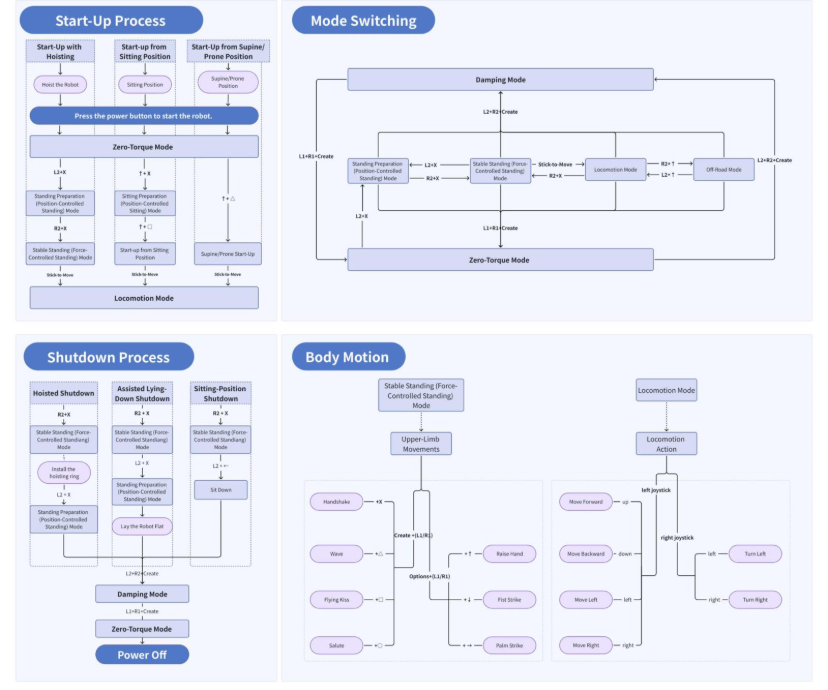
3.5.3.2 Emergency-Stop Mode Switching Instructions
- When the robot is walking, short press
[L1 + R1 + Create]to trigger an emergency stop. - To cancel the emergency stop, press
[L2 + X]to switch back to standing preparation mode. - Avoid triggering emergency-stop mode unless necessary.
3.5.3.3 Full-Body Mode Switching Button Description
- Hoisted start-up:
L2 + X, thenR2 + X, then push joystick to move. - Supine start-up: short press
Up + Triangle. - Prone start-up: short press
Up + Triangle. - Sitting start-up: short press
Up + X, thenUp + Square. - Zero-Torque Mode: short press
L1 + R1 + Create. - Damping Mode: short press
L2 + R2 + Create. - Off-Road Mode: short press
R2 + Up. - Sit down: short press
L2 + Left.
3.5.4 Interaction Action Library Control
The following robot actions can be performed through the controller:
| Action Type | Action Name | Button Instruction |
|---|---|---|
| Head Movements | Clockwise / Counterclockwise / Downward Tilt / Upward Tilt | Hold L1 and push the left joystick |
| Upper-Limb Movements | Wave / Handshake / Flying Kiss / Salute / Fist Strike / Palm Strike / Raise Hand | Use Create or Options plus L1 / R1 with action keys |
| Waist Movements | Clockwise / Counterclockwise / Bend Forward / Straighten Waist | Hold L1 and push the right joystick |